What Makes a Computer Fast ?

much like any highway a computers speed is determined by several factors.

Usage:
Are you running programs that do complex computations?

Memory:
For pure computing power this is not so much an issue as it is when running games and flash
.

The fact is, like any highway the computer is only as fast as its slowest part and that is the front line bus.
this is much slower than you clock speed and the real bottle neck.
 
u'll have to learn to build ur own system if u want a fast computer and save a lot of money, but it seems like ur too lazy to do that, u could just goggle search all those things(ram, memory, cpu, gpu etc) instead of asking about them on TERB(not a computer related forum), it's better if u just buy one from bestbuy or futureshop :), just tell them u want a fast pc


ncix.com is a good one, they have few store in ontario and they can build u a fast one....
another one is tigerdirect.ca they have a few stores in ontario too buy they charge more....
 
We really need to know what he wants to do with it. If by fast he means that when he clicks on a program icon it opens right away then a faster hard drive and more memory should do the trick, but if he wants to play the latest video games then he needs a more expensive video card. If he wants web browsing to be faster then it's internet connection speed along with memory and cpu.

By analogy to a work shop such as for woodworking:

Ram - the workspace your computer has to do things, the bigger the workspace the more it can do at once, too small and it will spend time clearing away one task to make a work area for another (swapping), just like if you had a work bench and a few different projects set up on it--the bigger the work bench, the more projects you can have on the go at once.

Hard drive - long term storage area, things are loaded into ram when they are needed and kept here when they are not currently needed. Think of it as the warehouse next to the work shop. A bigger drive allows you to store more things, a faster drive lets you get them set up in ram faster when they are needed. How quickly your computer starts is basically determined by how fast it can move everything it needs from the hard-drive to RAM, and that also determines how quickly new programs can be launched when you click on them.

CPU - the worker, how many workers and how fast they work with their hands. A "multiple core" CPU has multiple workers--one for each core--each capable of working on a separate task. How fast each worker performs those tasks depends on the rating of the CPU, how many gigahertz it has.

Bus - the speed of the connection between the cpu and ram, determines how quickly the worker moves around the workshop, so also how fast they work. The faster the bus speed the quicker the workers can move from one task to the next, depending on the task, this can be more important than raw CPU speed, and often is.

Video card - literally a separate computer inside your computer that is very specialized for graphics with its own cpu and its own ram, things like games do alot of computer animation and a better video card speeds that up alot, also hd video. Think of it like a video lathe, a very fast and specialized machine that does nothing but graphical work, but does that very very quickly.
 
Last edited:
Thanks to Pimpin_civic, Libra, Slewdem and everyone who gave advice, even the jokers.


Mr_bingoBrown I did GOOGLE and as usual found sites that did not offer what I found here on TERB. Things are explained on how they work together.


We really need to know what he wants to do with it. If by fast he means that when he clicks on a program icon it opens right away then a faster hard drive and more memory should do the trick, but if he wants to play the latest video games then he needs a more expensive video card. If he wants web browsing to be faster then it's internet connection speed along with memory and cpu.

Good questions Fuji. If programs opened and worked faster that is a bonus to which I would not say no.
Games not so much. I will only play the occasional online game, but it is not important to me.
Surfing is thee number one concern. I want to be able to go from TERB to the NHL site to the Leaf site to CAP GEEK to NFL to etc, etc and back to TERB as quick as I click.


Again thank you to all for taking the time.
 
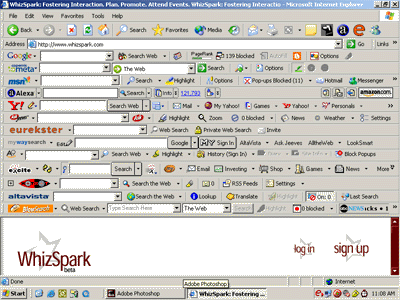
Porn. Load lots of porn. Ignore the virus warnings. The more porn you download the better your computer will run. You will see the performance improve as you acquire more and more search bars.
toolbar400gif-thumb.gif
 
Porn. Load lots of porn. Ignore the virus warnings. The more porn you download the better your computer will run. You will see the performance improve as you acquire more and more search bars.
toolbar400gif-thumb.gif

You forgot to mention that besides the difference in speed, you computer develops an automatic keyboard. As soon as you boot up, it will start travelling to new websites and automatically running new programs - you can just sit back and watch ! Also anti-virus software is a major drain on your PC speed - get rid of that too !
 
Surfing is thee number one concern. I want to be able to go from TERB to the NHL site to the Leaf site to CAP GEEK to NFL to etc, etc and back to TERB as quick as I click.

So realistically practically any computer you can buy these days is going to be fast enough for that. You do not need a massive CPU and you do not need the latest greatest video card. The things that are going to make a difference in terms of your computer will be how much RAM you have, and how fast your hard drive is (as opposed to how big it is). Put a generous amount of RAM in the machine and if you really want to go all out buy one of those SSD hard-drives, a good one, that is blindingly fast. That will ensure that any "cache" operations your browser performs are quick, and also that the browser components themselves load quickly when needed. Any modern CPU will be fast enough, and any modern video card will be good enough.

What's going to make the biggest difference here, though, is not really your computer but rather the quality of your network connection. Buy a cheaper computer and spend the money you save upgrading your internet connection to the fastest connection that you can afford.
 
Surfing is thee number one concern. I want to be able to go from TERB to the NHL site to the Leaf site to CAP GEEK to NFL to etc, etc and back to TERB as quick as I click.

At minimum any old Pentium 4 PC with maxed out RAM and a cable connection will do this. I picked up a used Dell PC like that off CL for $80 awhile back that serves this purpose well.